Virtual Villagers Tips & Tricks, Walkthroughs, Guides, Hints and Help Last Day of Work Official Forums: Virtual Families, Virtual Villagers, Fish Tycoon
Facebook
Who's Online
0 registered (), 338 Guests and 3 Spiders online.
Key: Admin, Global Mod, Mod
Recent Posts
Bruh, why is there AI in LDW games.
by lorsieab2
02/11/26 12:10 AM
LDW Links
LDW
Virtual Families
Virtual Villagers
Fish Tycoon
Plant Tycoon
Newest Members
Booyahhayoob, elayne%, BillCrimbers, eunrae :3, Quiet-Tumbleweed
30763 Registered Users
Forum Stats
30763 Members
78 Forums
19416 Topics
187031 Posts

Max Online: 2435 @ 12/29/25 09:52 AM
Page 1 of 2 1 2 >
Topic Options
#28506 - 08/02/06 11:20 AM A problem...
Raven_Rox Offline
Trainee

Registered: 07/01/06
Posts: 24
Hey, I downloaded the mac version of Fish Tycoon and Virtual Villagers, but when I opened it, the icon just bounced in the dock and disappeared. Anyone know what's wrong?

Top
#28507 - 08/02/06 11:26 AM Re: A problem...
LadyCFII Administrator Offline
Unicorn

Registered: 10/07/04
Posts: 17515
Loc: Colorado
The problem that you are having is usually caused by insufficient video memory (VRAM) in your Mac. The Mac version of the game typically requires at least 32MB of VRAM in order to run.

You can find out how much VRAM is installed in your Mac by following this procedure:

Click on the Apple icon in the upper left corner of the display. Click on About this Mac. On the popup window that results, click More info...
The System Profiler will be displayed. In the left pane, there should be listed something like Graphics/Display (may vary depending upon your Mac's model and age). Click on that and you'll see your display specifications in the right pane. Your video memory will most likely be displayed as VRAM (total).

If it's less than 32MB, you will probably not be able to run Fish Tycoon.
_________________________
Barbara
Unicorn
Last Day of Work

Top
#28508 - 08/03/06 07:09 AM Re: A problem...
Raven_Rox Offline
Trainee

Registered: 07/01/06
Posts: 24
Where is the left pane? Because whatever I click, there is no Graphics/Display...

Top
#28509 - 08/03/06 07:33 PM Re: A problem...
LadyCFII Administrator Offline
Unicorn

Registered: 10/07/04
Posts: 17515
Loc: Colorado
What version of OS are you running? On all of my systems (10.3.9 and later), the System Profiler displays device categories in the left pane and details in the right pane.
_________________________
Barbara
Unicorn
Last Day of Work

Top
#28510 - 08/03/06 09:59 PM Re: A problem...
squawky Offline
Master

Registered: 04/12/06
Posts: 596
Loc: New England
On my 10.3.9 machine, there is no "Graphics/Display" in the left pane -- the information on the graphics card is in the "PCI/AGP Cards" listing.

(That's a desktop machine, but I think a laptop has a similar thing.)

Worse comes to worse, if you post your machine's specs (processor type and speed, plus the amount of RAM), it might be possible to guess what the video card is.

-- jen

Top
#28511 - 08/05/06 12:33 PM Re: A problem...
Raven_Rox Offline
Trainee

Registered: 07/01/06
Posts: 24
I think mine is 10.2 (I'm not sure if there are more decimals at the back). Oh yes, mine is also a desktop machine.

Top
#28512 - 08/05/06 02:36 PM Re: A problem...
squawky Offline
Master

Registered: 04/12/06
Posts: 596
Loc: New England
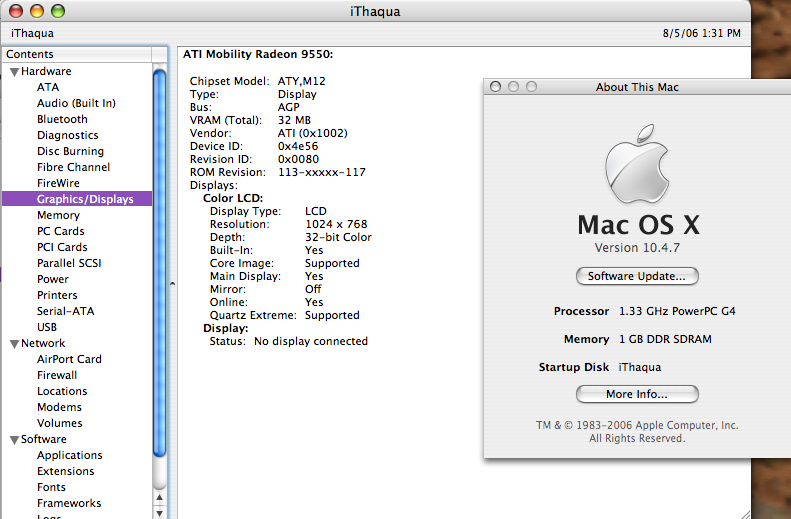
The operating system version (10.2 for you) doesn't matter for determining what video card you have: if you follow the instructions Barbara gave above, you can open up the "system profiler", which should give you a window, where you can click on "PCI/AGP Cards" or "Graphics/Display" to see what your video card is.

Basic information on your machine is available in the "About This Mac..." window that you open from the Apple menu as part of this process.

I've attached a screenshot showing both windows -- just click on "attachments" to see it. The important information is the "VRAM" listed under the video card, and the "Memory" listed in the about his mac window. (Click on "attachments" above to view)

-- jen


Attachments
28136-sys-specs.png (112 downloads)

_________________________
It is pitch black. You are likely to be eaten by a grue.

Top
#28513 - 08/05/06 11:26 PM Re: A problem...
Raven_Rox Offline
Trainee

Registered: 07/01/06
Posts: 24
I still don't quite understand...And I can't play Virtual Villagers either! The same thing happens-the icon just bounces in the dock and disappears.

Top
#28514 - 08/05/06 11:46 PM Re: A problem...
LadyCFII Administrator Offline
Unicorn

Registered: 10/07/04
Posts: 17515
Loc: Colorado
Virtual Villagers has the same system requirements as Fish Tycoon. It sounds like you don't have enough video memory. Jen's screenshots were pretty good at showing the method for checking how much video memory is in your Mac.
_________________________
Barbara
Unicorn
Last Day of Work

Top
#28515 - 08/07/06 02:25 AM Re: A problem...
Raven_Rox Offline
Trainee

Registered: 07/01/06
Posts: 24
The screenshots look too confusing...they are different from when I click on the 'About this Mac' button.

Top
Page 1 of 2 1 2 >


Moderator:  MissKathy, Rockmower 
Smileys
Arthur on Twitter