Virtual Villagers Tips & Tricks, Walkthroughs, Guides, Hints and Help Last Day of Work Official Forums: Virtual Families, Virtual Villagers, Fish Tycoon
Facebook
Who's Online
0 registered (), 508 Guests and 2 Spiders online.
Key: Admin, Global Mod, Mod
Recent Posts
Bruh, why is there AI in LDW games.
by Hydra14
02/01/26 10:06 AM
Devotion skill
by lorsieab2
01/21/26 07:03 PM
Cannot get Red Masks to leave Rainbow Totem
by MissKathy
01/10/26 02:40 AM
LDW Links
LDW
Virtual Families
Virtual Villagers
Fish Tycoon
Plant Tycoon
Newest Members
elayne%, BillCrimbers, eunrae :3, Quiet-Tumbleweed, Berniemike
30762 Registered Users
Forum Stats
30762 Members
78 Forums
19415 Topics
187028 Posts

Max Online: 2435 @ 12/29/25 09:52 AM
Page 1 of 2 1 2 >
Topic Options
#199528 - 06/20/09 05:19 AM Glitch? Adjusting the painting
MissKathy Administrator Offline
Lead Tester

Registered: 06/07/09
Posts: 1260
Loc: California (USA)
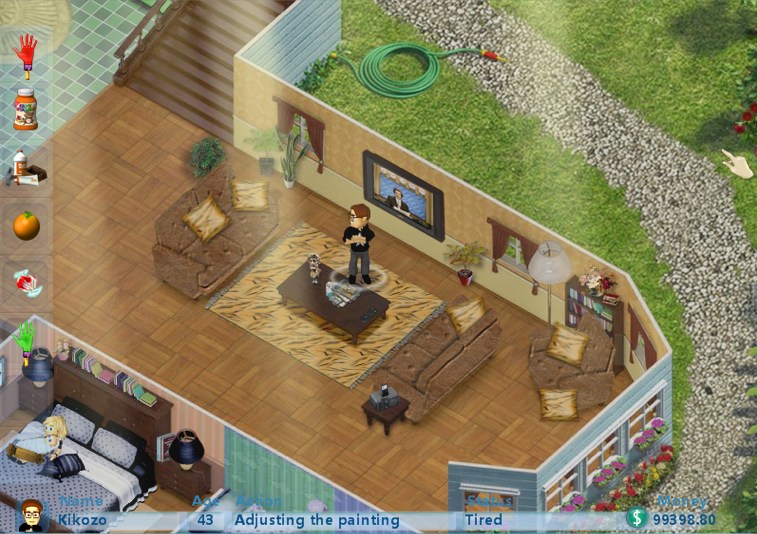
Ever since updating to version 5 this week I've noticed my peeps standing around doing nothing while the comments say "Adjusting the painting". There is no painting there. They do it all over the house... just standing there as if frozen in time, even on the treadmill. Is this a glitch? Can it be fixed?


Attachments
glitch.jpg


_________________________
Kathy
Lead Tester
Last Day of Work

Top
#199548 - 06/20/09 04:26 PM Re: Glitch? Adjusting the painting [Re: MissKathy]
BayouBlonde Offline
Master

Registered: 03/30/09
Posts: 486
Loc: Louisiana
This is a new one to me, but I notice you do have the paintings in the house. The action is a common one, but normally they will walk to the painting and it only lasts a short time. Are they remaining in this action state until you move them?
_________________________

Top
#199557 - 06/20/09 06:55 PM Re: Glitch? Adjusting the painting [Re: BayouBlonde]
Xay Administrator Offline
Customer Support Director

Registered: 02/18/07
Posts: 2222
Loc: Colorado, US
MissKathy, what version did you have before upgrading to .05?
_________________________
Heather
Customer Support Director
Last Day of Work
LDW Help Center
Submit a Support Request

Top
#199558 - 06/20/09 07:14 PM Re: Glitch? Adjusting the painting [Re: Xay]
MissKathy Administrator Offline
Lead Tester

Registered: 06/07/09
Posts: 1260
Loc: California (USA)
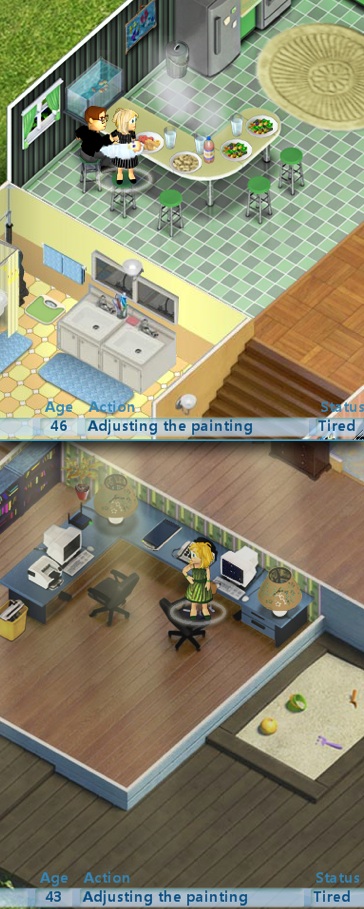
I had .02 since May 1st. Here are 2 more examples:


Attachments
adjusting.jpg


_________________________
Kathy
Lead Tester
Last Day of Work

Top
#199559 - 06/20/09 07:16 PM Re: Glitch? Adjusting the painting [Re: BayouBlonde]
MissKathy Administrator Offline
Lead Tester

Registered: 06/07/09
Posts: 1260
Loc: California (USA)
It seems that I have to move them, otherwise they just stay there. I'll pay more attention next time so I can be sure. smile
_________________________
Kathy
Lead Tester
Last Day of Work

Top
#199560 - 06/20/09 07:17 PM Re: Glitch? Adjusting the painting [Re: MissKathy]
Xay Administrator Offline
Customer Support Director

Registered: 02/18/07
Posts: 2222
Loc: Colorado, US
And did you upgrade to .02 from .00 or .01?
_________________________
Heather
Customer Support Director
Last Day of Work
LDW Help Center
Submit a Support Request

Top
#199562 - 06/20/09 07:27 PM Re: Glitch? Adjusting the painting [Re: Xay]
MissKathy Administrator Offline
Lead Tester

Registered: 06/07/09
Posts: 1260
Loc: California (USA)
No. The original version purchased was .02 . I was very happy with it (and the ghosts) and only upgraded because my oldest peeps never lived well into their 60's. The 'age 70' trophy didn't look within their reach. In .05 it was reduced to 'age 65'.
_________________________
Kathy
Lead Tester
Last Day of Work

Top
#199563 - 06/20/09 07:45 PM Re: Glitch? Adjusting the painting [Re: MissKathy]
VVJunkie Offline
Adviser

Registered: 08/09/06
Posts: 52
I just purchased this game and have version .01 and am having a money glitch. The husband should be getting $54 but only received $5 for a career goal.

How do I go about upgrading to the current version? TIA

Top
#199564 - 06/20/09 07:55 PM Re: Glitch? Adjusting the painting [Re: VVJunkie]
LadyCFII Administrator Offline
Unicorn

Registered: 10/07/04
Posts: 17515
Loc: Colorado
There isn't a glitch in the money that the peeps are paid. If you read this post it will be more clear how they are paid. smile
_________________________
Barbara
Unicorn
Last Day of Work

Top
#199566 - 06/20/09 08:06 PM Re: Glitch? Adjusting the painting [Re: LadyCFII]
Xay Administrator Offline
Customer Support Director

Registered: 02/18/07
Posts: 2222
Loc: Colorado, US
We're looking into this, MissKathy.

VVJunkie, if you purchased the game directly through us, please see this post. If you did not purchase the game through us, you will have to contact the company you purchased the game through to receive the update.
_________________________
Heather
Customer Support Director
Last Day of Work
LDW Help Center
Submit a Support Request

Top
#199570 - 06/20/09 08:39 PM Re: Glitch? Adjusting the painting [Re: Xay]
MissKathy Administrator Offline
Lead Tester

Registered: 06/07/09
Posts: 1260
Loc: California (USA)
Thanks Heather. smile
_________________________
Kathy
Lead Tester
Last Day of Work

Top
#199678 - 06/21/09 07:07 PM Re: Glitch? Adjusting the painting [Re: Xay]
VVJunkie Offline
Adviser

Registered: 08/09/06
Posts: 52
Thanks ladies. That post clears up the money situation and I have contacted support where I have purchased the game.

Top
#200942 - 06/29/09 07:03 PM Re: Glitch? Adjusting the painting [Re: VVJunkie]
Evan'smom Offline
Newbie

Registered: 05/29/08
Posts: 8
I have the updated version 1.00.05. My peeps get stuck adjusting the picture, too. Has anyone found out if this is a glitch or not??

Top
#200949 - 06/29/09 07:47 PM Re: Glitch? Adjusting the painting [Re: Evan'smom]
LadyCFII Administrator Offline
Unicorn

Registered: 10/07/04
Posts: 17515
Loc: Colorado
Yes, it's a glitch in the game.
_________________________
Barbara
Unicorn
Last Day of Work

Top
#200950 - 06/29/09 07:48 PM Re: Glitch? Adjusting the painting [Re: LadyCFII]
Evan'smom Offline
Newbie

Registered: 05/29/08
Posts: 8
Thank you.

Top
Page 1 of 2 1 2 >


Moderator:  MissKathy, Rockmower 
Smileys
Arthur on Twitter