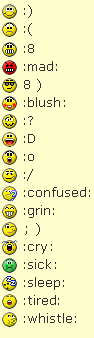
You need to click REPLY, not the quick reply, the regular reply. Then, above where you type, there are smileys. Right-click on the one you want, select properties. When the properties window pops up, you will see a web address. Copy that address into your reply, with these tags around it:
So, for the whistle/kiss, you use this:
[img]http://www.ldwforums.com/ubbthreads/images/icons/default/whistle.gif[/img]

EDIT: Or what Tmac said. My instructions will work on all the smileys, though, so you can use hers for the "word" smileys and mine for the others...


 Previous Topic
 Index
Index