RED DEAD LEAVES MODIFICATION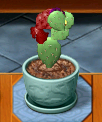
I may have missed a plant or two.. if so let me know which.
Here are the image files for the dead leaves colored in RED:
http://www.box.net/shared/1l3658uj0t Here are the original (brownish) dead leaf images:
http://www.box.net/shared/13vj9y1mcxTo use this modification is pretty much the same as for all the Plant Tycoon Modifications. Download the zip file, unzip it, copy all the files to your Plant Tycoon Image directory at:
C:\Program Files\Plant Tycoon\Images
To reverse the modification, download the original brown leaves zip file and copy those files to that same directory.
Since box.net will delete files that have not been accessed recently, download them both so you will have them if you need them in the future.
Another choice instead of downloading the brown leaf file is to make a complete backup of your Image directory (call it
Copy of Images or something) and use that to overwrite the red dead leaves in the future if you get tired of them.
I'm not the best at explaining things clearly so if you have any questions you can leave them in a response to this thread (if you don't get an answer in 24 hours or so, send me a PM and call me a slacker

)


 Previous Topic
 Index
Index


